Showing posts with label windows phone. Show all posts

Thursday, 9 June 2016

Top 10 upcoming smartphone releases

There are some very exciting upcoming smartphone releases that are just gonna rock the technology world with their impressive features, futuristic innovations and awesome quality.Here is our countdown of the top 10!


10.LG G Flex 3

As per now LG has launched LG G5 on 21st Feb with really impressive and advanced specification and now G Flex 3 is not so far from launch. As per rumors LG will soon unveil LG G Flex 3 smartphone in mid 2016.


Key Features

  • 6-inch Full HD display
  • Android v6.0
  • Snapdragon 820 SoC
  • Adreno 530 GPU
  • 4GB RAM
  • 32, 64GB storage
  • 20 MP primary camera
  • 8MP front camera
  • 3500 mAh battery

9. Samsung Galaxy S7 Edge( plus )

Samsung galaxy S7 edge plus will be the next best Smartphone from Samsung, after Launching the S7 and S7 edge, Samsung is thinking to upgrade the Galaxy S7 Device with the upcoming smartphone s7 edge plus. However there is no confirmed Release date of the device, but it seems as it may be announced in upcoming 3 to 4 months. First the device will be made available in USA, Brazil, and other countries, then it will enter India.


The Samsung galaxy S7 edge(plus),  is packed with some high-end specifications, and the device will also come with some enhancement like improved camera and improved the quality of display.Apart from this improvement the specs will be similar to Samsung Galaxy S7edge. Samsung galaxy S7 edge plus will have a coparetivlylower price tag than Samsung galaxy S7.

8. Sony Xperia M Ultra

According to a new rumor out of China, Sony will launch a new smartphone dubbed Xperia M Ultra. Specs-wise, the device is said to be powered by Snapdragon 652 chipset, and sport a 6-inch full HD display.There are some other specs rumors we are getting like, the Sony Xperia M Ultra will sports a 6-inch Full HD IPS-NEO screen display. The device will be powered by Qualcomm Snapdragon 652 SoC, along with 3GB of RAM,The devise will have 32 GB storage.


Key Features


  • 3GB RAM
  • 23-megapixel and 16-megapixel front
  • 6-inch Full HD IPS-NEO Display
  • 32 GB of inbuilt memory
  • Boosted by Snapdragon 652 processor

7. Xiaomi Mi 6

Xiaomi is the brand which is pretty famous for its cheap and high-end smartphones. Xiaomi.Mi6 is supposed to be prepared through a 5.2” (inch) UHD display, which is perfect if love to watch movies on your smart phones.


Key Features

  • Ultra HD 2160 x 3840 pixels Super AMOLED display
  • Qualcomm Snapdragon 830
  • with 6GB of powerful RAM
  • may come with 5g network
  • 4200mah battery
  • 21-Megapixels back and 13-Megapixels front camera

6. HTC and Google’s Nexus Smartphones

After the launch of its flagship smartphone HTC 10 and another variant HTC 10 Lifestyle now they will be looking at the Nexus series smartphones this year, as per the rumors the HTC has been selected by google for the next best nexus upcoming smartphones. The previous smartphones were created by Huawei and Google as Nexus 6P and Nexus 5x, but it looks now the contract is over, and Google has found the best partner for its next device.


HTC as per the rumours they will be making two Nexus devices one is really premium and another is budget Smartphone. The specifications of the smartphones are not leaked anywhere, but we manage to bring some most suitable specs for the high-end nexus smartphone.

Key Features


  • Packed with Qualcomm Snapdragon 830 chip
  • It will be powered with a 4GB of RAM
  • It will have 5.5-inch 2,560 x 1,440 quad-HD AMOLED display
  • 21-megapixel camera on the back 
  • 16, 32, 64, 128GB storage and will have expandability option
  • 44000mAh last longer battery

5. Nokia C1


Finally Nokia officially announced that they are coming back in mobile industry. Nokia has made an agreement with HMD.The wait is finally over for those who love Nokia phones. We may see some best Nokia smartphones at the end of 2016.


Key Features


  • 2GB of RAM
  • 32GB internal storage
  • 4G support
  • 8-megapixel rear camera and 5-megapixel front camera
  • 5-inch display
  • The price will be Less than 20k in India and Approx 300 $


4. Microsoft Surface Phone

It seemed inevitable that Microsoft would create a Surface Phone — not an official name — after it acquired Nokia. In fact, there was talk long before that too, but Microsoft has often denied those rumors and stuck with producing new Lumia phones. However, rumors and leaks regarding such a device have continued, suggesting it’s something the company may still be considering.It is expected to e released in late 2016 or early 2017.


Key Features


  • Quad HD 5.5-inch AMOLED screen
  • Gorilla Glass 4
  • Snapdragon processor 830
  • 8GB of RAM (DDR4)
  • 21-megapixel rear camera and 8MP front camera
  • 64GB or 128GB of internal storage
  • 4000mAh battery

3. OnePlus three (3)

OnePlus 3 will be the successor of OnePlus 2.There are many rumours spreading about the features OnePlus three is likely to have.Anyway, it is clear that this device will be more efficient and powerful than its previous version.That is exciting news because, the previous version OnePlus two was noted for its good camera and fabulous performance. OnePlus 3 will be released on 15th June 2016.


Key Features

  • 4 and 6 GB RAM Variant
  • 5.5-inch AMOLED full HD display
  • Snapdragon 820 processor
  • 16-megapixel back and 8-megapixel front cam
  • Oxygen OS with android M

2. Samsung Galaxy Note 6

It’s not long until the release date of the Samsung’s Galaxy Note 6 is officially announced, and the rumours are rapidly reaching fever pitch. With whispers of Android N, USB Type-C, a whopping 6GB of RAM and a frankly outrageous 256GB of storage, the Note 6 is set to be a beast.


And if that doesn't whet your whippet, then the news of a 5.77in, 2K Super AMOLED display just might.


Key Features


  • 30MP and 16MP isocell camera
  • 6 GB RAM can touch up to 8GB
  • Include 4700mAh battery
  • Storage option from 16GB to 256GB
  • Samsung Exynos 9 Octa processor
  • 5.5-inch 4K display

1. Apple iPhone 7

The iPhone 7 should be more revolution than evolution, and will come with a raft of new features, all packaged in a totally redesigned handset. Apple has kept most of the iPhone 7 details under wraps, but as we approach its release date, we’re slowly uncovering more details about the next iPhone.It is rumored that iPhone 7 will have a built in projector!


Key Features


  • The iPhone 7 will be packed with iOS 10
  • Upgraded Apple A10 chipset processor
  • Have an e-SIM traditional SIM card will no more.
  • Waterproof Technology
  • Reversible USB charger
  • No headphone jack this time
  • Will be available in 4.7-inch and 5.5-inch variant.
  • Slimmest iPhone ever created
  • Iphone 7 will be cost approx Rs. 61454.72 in India and USD $937


Monday, 30 May 2016

Secret WhatsApp Tips and Tricks You Probably Don’t Know


WhatsApp is definitely the best mobile messaging app ever made for Android, iPhone, Blackberry, Nokia & Java Mobiles. If you have active Internet connection on your mobile phone, then with the help of this app you can send unlimited messages, videos, audios, images to anyone. As we all know that the WhatsApp’s popularity has grown so popular that many WhatsApp tips and tricks coming in the internet. It is estimated that WhatsApp has more than 400 million active users around the world. Due to it’s fast message delivery service and some other cool features many people were attracted towards it. Here in this tutorial we are sharing some of the best Whatsapp Tips and Tricks Collection for every user who are using Whatsapp app on their mobile phones or PC.


1. Use WhatsApp without your Mobile Number

You can use WhatsApp without number that means not with your own number. So this trick may help you to do that easily and you can activate WhatsApp with a number which is not your own i.e fake. Just follow the below steps and enjoy.
  • If you are already using WhatsApp, uninstall it from your device completely. Download and install it again.
  • Lock your messaging service simply by changing the flight mode.
  • Now open WhatsApp and add your number to it. So it will not be able to send the message to the server it will ask you to choose an alternative method to verify.
install-whatsapp-without-phone-number
  • Choose the verify through message option and fill up your email address and then Click on ‘Send’ option and without waiting click on ‘Cancel’. This terminates the authorization process.
  • Now, you are required to forge messages. Install the message Spoof text message for Andriod and Fake- a- Message for iPhone.
  • Spoofing method: Go to your Outbox -> Copy the message details to spoofer app -> Send it to spoofed verification.
  • Use the following details.
    To: +447900347295
    From: +[Country code][mobile number]
    Message: Your email address
  • A message will be sent through that spoofed number. You can use this number to connect with your friends

2. Hide “Last Seen” Timestamp

By default, WhatsApp shows a “last seen” timestamp, telling other users the last time you were on WhatsApp. It’s a great feature, but the function becomes really annoying because it reveals whether you are online or not. You can not hide from your friends and they’ll keep talking to you. So if you want to hide this ” last seen in the” time stamp follow the below mentioned steps.
hide-last-seen-on whatsapp
Earlier there are many third party Applications available in Google Playstore to hide ‘last seen’ feature. By the recent update, you can use this feature without installing any other apps.
  • Download the latest version of WhatsApp from the official website to enjoy this feature.
  • To hide last seen feature, Open WhatsApp, Go to Settings > Account > Privacy > Last Seen.
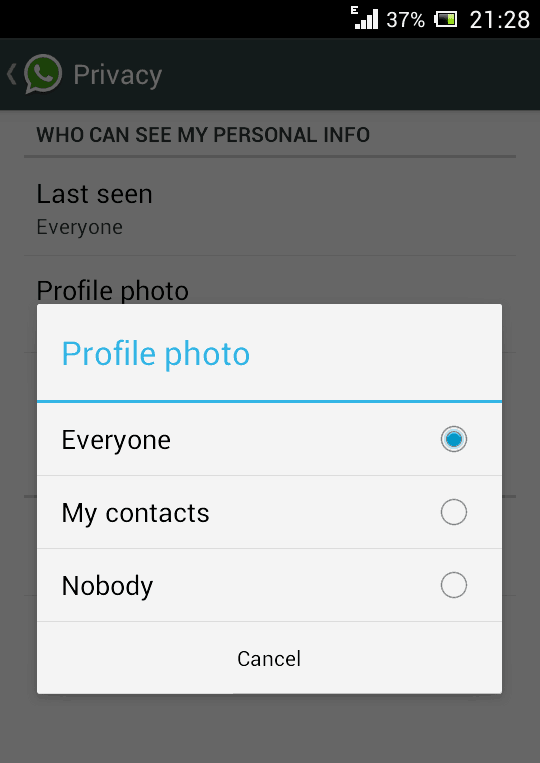
  • There you can select three options, Everyone, My contacts, Nobody. Select any one of them.

3. Spy and Read the Conversation of Your Friend

Is it possible to Spy into Whatsapp conversation of the your close friends and read their conversation? Yes, it is possible and i’ll explain you about this awesome trick through which you can spy your friend conversation. Just follow the below mentioned steps.
hack your friends whatsapp chat
  • Firstly, you need to do is, go to the MicroSD card and then click on the Whatsapp and later on on the Database option.
  • Immediately after you are done with the first step you’ll get two files such as,msgstore-yyyy..dd..db.crypt
    msgstore.db.crypt
  • After finding these two files, you just need to do is take these files from your friends mobile and then you will be easily able to read their conversations that they have done with their friends. You can open them using a simple text editor.

4. Backup And Restore WhatsApp Chats

WhatsApp makes automatic backups of your chats, but you can also make a manual backup. Follow these simple steps to restore your whatsapp chats.
whatsapp_android_restore_backup
  • On iOS, Go to Settings > Chat Settings > Chat Backup, then click Backup Now.
  • On Android, just go into Settings > Chat settings and tap Backup conversations to create a backup.
  • It will not backup your media, so you will need to use a file manager to backup the media files in /sdcard/WhatsApp/Media on your mobile.
  • There’s no way to restore chats directly from WhatsApp, so if you want to restore a backup just uninstall and reinstall WhatsApp.
  • While you begin WhatsApp just after the reinstalling your app, you should be prompted to restore your most recent backup.

5. Send files of other Extensions like Zip, Rar, PDF


share-pdf-exe-zip-apk-with-whatsapp
  • We all know that WhatsApp doesn’t support to send other files than audio and video formats. There is not any option to share documents, compressed files, and other files using WhatsApp. But with an additional app like Cloud Send you can send PDFs, APKs, Word documents and more using WhatsApp.
  • You can also use third party app like Whats Packed 2 ads to send any files of any size via WhatsApp. But make sure that both the sender and receiver must have Whats Packed 2 ads application installed on their smartphone.

6. Disable WhatsApp Auto Image Download

By default WhatsApp download all images, videos and voice notes to your memory which will create lot of mess in your gallery. Sometimes this may kill your mobile data and battery life when you have a very low data balance on your mobile. So this trick will be helpful to stop auto download of images or video.
Settings > Chat Settings > Media Auto Download. Select an option from all three which suits you.  If you want to completely disable auto download, make all options to No Media.
Diable-auto-download-of images videos in whtasapp

7. Hide your WhatsApp Profile Picture(DP)

Due to privacy concerns , or anything else , if you want to hide your profile picture this trick will definitely help you. Hiding Profile Picture option is only available for the latest version of WhatsApp. If you are not using latest version then download it and after installing go to Settings > Account privacy. Then click on Profile Photo, select any of the three options according to your needs – Everyone, My contacts, Nobody.
hide-profile-pic-whatsapp

8. Change Your Friend’s Profile Picture

You can change your friend’s profile pic into your WhatsApp by using this new and an awesome trick to prank your friends. Follow the below mentioned easy steps to do it.
Change Your Friend’s Profile Picture on whatsapp
  • Choose a profile picture for your friend. Use Google Image search for cute looking monkeys and donkeys or weird looking people.
  • Resize the image to 561×561 pixels using Paint or Photoshop and name it with your friend’s mobile phone number.
  • Save the image to the SD >> card WhatsApp >> Profile Pictures. Overwrite the existing file (if necessary).
  • Disable WiFi and data network. If you don’t WhatsApp will automatically update the picture.
  • Now, you show your friend the pic your profile WhatsApp instant panic invite her face.
Note: This is not a hack, but simply a trick to change your friend’s profile picture only on your device. This is meant for fun purpose only.

9. Create A Fake / Chat Conversation

This trick is going viral these days and many people are creating funny fake conversations and posting the screenshots over social media like Facebook and Google Plus. By using an app like WhatSaid-Whatsapp Prank you can easily create fake conversations and play pranks on your friends.

Download WhatSaid App Here

Whatsaid - Whatsapp Prank app for whatsapp
You will be able to create fake conversations with anyone by adding your photos, name it and create your own posts ( on both sides). Don’t use it to spoil someone’s life please.

10. Hide Two Images In One

Do you want to send an image to your WhatsApp friend which will first look like a beautiful one but when he/she click on it, the image will change to another one? Then just follow below steps…
magiapp for whatsapp

  • Now after installing this wonderful app just fire it up and then you will see interface something lie in the image on the right.
  • Now just click on the True Image option and choose your original image and then click on the Fake Image option and choose your pranky image.
  • Now after selecting your images just press Do Magic ! option and voila! its done now just share your image with everyone.

Saturday, 28 May 2016

Traffic Rider Review: High Speed Thrills

Traffic Rider Review: High Speed Thrills


Although plenty of racing games existed before mobile, I feel like the advent of iOS and Android devices spawned a whole new era. While it's generally difficult to craft high quality simulation experiences for PC and console platforms, tons of developers are able to create arcade-like games for mobile, often times to great success. This goes for none other thanTraffic Rider [Free], which feels like a fully-fledged racer in its own right.
So what's the point of Traffic Rider? Well, to ride through traffic of course! Using a motorcycle to split lanes and weave in and out of traffic, you'll navigate linear tracks on your way to a finish line. The catch is that cars have a mind of their own, accelerating or braking in odd places. It's tough to really get anywhere at all times, but the control scheme is so good that it will help facilitate your way through that challenge. There are many times where I'd drop acceleration, drift through a few cars, and it would always be a rush. You also get bonuses for maintaining a high level of speed and achieving near misses with traffic.
Traffic 1
You'll progress through by way of a loosely tailored story mode, which beats most of the "endless only" games that get old after repeated play. The map is pretty massive with over 40 levels, as well as bonus objectives for reaching a better clear time. I would have mostly been content with just cityscapes, but there's also long stretches of desert to navigate through, as well as highways with lots of different pieces of scenery, mountainscapes, and even a day and night cycle.
When it comes to other modes, Traffic Rider also delivers. Outside of the career map there's an endless mode (with options for both one or two-way boards), a time trial gametype, or free ride. You'll need to level-up to unlock most of these, but given how fun the game is to play it doesn't feel like work in the slightest.
Traffic 2
I adore the control methods that they baked in, as games usually tend to force you into tilt or virtual pads. With Traffic Rider you can choose either method, with the latter sporting two different options (handlebar control or a standard d-pad). Throttle can also be controlled manually or set to automatic acceleration, the whole scheme can be inverted, and the sensitivity can be altered. It's pretty comprehensive and should suit basically every player's needs. My personal favorite is definitely tilt as it's very responsive, and the throttle is perfectly placed so you don't put your thumbs over the action, even with limited screen real estate.
In terms of IAP, Traffic Rider is one of the least offensive free games. There's a starter pack for $6.99 that grants you a new bike, cash, and gold, as well as the power to remove ads. Thankfully you can purchase any of these options piecemeal, in addition to the remove ad ability for $1.99, and a cash doubler for $4.99. The one thing that I don't like however is the "key" purchase, which unlocks a mode piecemeal for $1.99. It's a bit much since there's multiple gametypes to be unlocked through this  method, but general play will get you there eventually anyway.
I was surprised by how much depth Traffic Rider has, and it's in my regular rotation at this point. With responsive controls and a uniquely programmed set of AI cars to navigate, this one will keep you busy for a while.

Sunday, 22 May 2016

How to roll back from Windows 10 Mobile preview to Windows Phone 8.1

How to roll back from Windows 10 Mobile preview to Windows Phone 8.1


Today's forthcoming Windows 10 Mobile Insider update requires users to rollback to Windows Phone 8.1 first. Here is how to do that to get you prepped!


Windows Phone recovery tool


Below you'll find all the steps to help you go back safely to your previous version of the mobile operating system:

How to roll back from Windows 10


  • Download and install the latest version of the Windows Device Recovery Tool to your PC.
  • Launch the recovery tool and connect your phone using a USB cable. If your handset isn't detected, click My phone was not detected to force the application to rescan for and detect the phone.
  • In the next screen, click your phone, wait a few seconds, and you'll see your phone information and the software available for download to roll back to a previous operating system. To continue, click Reinstall software.
  • Next, the recovery tool will warn you to backup all your data, settings, and apps before continuing, as the rolling back process will delete all the previous data in your phone. Click Continue to proceed.
  • Now, the recovery tool will download the image from Microsoft's servers and replace Windows 10 Mobile that is currently on your phone. The process will take some time depending on your internet connection and the hardware in question.
After the tool completes the process, you will receive a message saying "Operation successfully completed". At this point, the phone will reboot and you will have to go through the Out-of-Box-Experience, like on any version of Windows. Then, you'll need to sign-in with your Microsoft account, select to restore your phone from backup (if this is something you prefer), and after a few additional questions, you'll be back to Windows Phone 8.1.
As you can see, Microsoft is making it very convenient to roll back to Windows Phone 8.1 from Windows 10 Mobile preview, and the company is starting to add support for non-Lumia devices, which is a big plus. So you don't have to spend time searching on the internet for different tools to go back to the previous operating system.
However, you have to remember that the operating system is far from complete. Not only will you find issues, but you might also stumble upon problems trying to roll back, as I hear many users reporting issues restoring Windows Phone 8.1 on their Lumia 930. As such, you should avoid using Windows 10 Mobile preview as your primary mobile operating system, at least until it hits RTM.
Did you have to roll back from Windows 10 Mobile to Windows Phone 8.1? If so, what was the reason? Let us know your experience in the comments below.

How To Install Windows 10 Technical Preview On Lumia 520, 930, 1520 and More!

How To Install Windows 10 Technical Preview On Lumia 520, 930, 1520 and More!


How To Install Windows 10 On Lumia 520, 930, 1520 and More!

Installing Windows 10 for supported Lumia devices

If you own the following devices, getting the latest Windows mobile OS will be a breeze. Here’s how you can do it.

List of supported devices:

  • Lumia 630
  • Lumia 635
  • Lumia 636
  • Lumia 638
  • Lumia 730
  • Lumia 830

Steps:


  • Ensure that your handset runs the current Windows Phone 8.1 platform. You may verify this by heading to Settings > About > Info.
  • After that, you will need to sign up for the Windows Insider Program if you haven’t already done it.
  • For the last step,  download and install the Windows Insider app from the Windows Phone Store.

How to install Windows 10 on unsupported Lumia models


Meanwhile, if your device is not included in the currently supported models metioned above, you don’t have to worry. A resourceful XDA Senior Member named “RustyGrom” has just posted a method on how you can run Windows 10 on non-supported devices. The dev provided the procedure along with download links in this forum thread. But if you need a outlined, step-by-step guide, check out what we listed below.
  • For the Lumia 1520 and other unsupported model, you need to reset them first using the Windows Phone recovery tool. The dev recommends not logging in and setting everything up yet and just waiting til the end, doing a reset and letting it restore after you’re on Windows 10.
  • Install the Windows Insider app on your phone (this time, you’ll need to have a store account configured)
  • Open the Insider app and go to the “About” options in the app bar and take note/screenshot/email the settings to yourself for later reference.
  • Download and extract the WPInsidersHacks app. The files are available in the developer’s post.
  • Launch the WPInsiderHacks app on your PC and approve any firewall requests.
  • Connect your phone to the same Wi-Fi with that of your PC. Edit the settings for the Wi-Fi connection to turn on the Proxy and set it to use the PC’s IP address and enter 8877 for the port.
  • Launch Internet Explorer on your phone and navigate to http://[pc.ip.add.ress]:8877 where [pc.ip.add.ress] is the IP address of the PC running the WPInsidersHacks app.
  • Tap on the link at the bottom to the fiddler root certificate.
  • When prompted, click open and then install to trust the cert and tap on OK at the confirmation.
  • Run the Windows Insider app and tap get preview builds.
  • Select which custom action you’d like to perform, e.g. “Set to ATT Lumia 635? and click the arrow at the bottom.
  • Accept the agreement and click the check mark at the bottom. After that, the app will close.
  • Now, clear your proxy settings and run the insider app again.
  • Tap on “get preview builds” and login to your Microsoft account.
  • Select the fast branch and click the arrow at the bottom.
  • Navigate to the phone settings and check for updates. If done properly, you should have Windows 10 there ready for you to install.